Free online booking and scheduling for solo and small service businesses

Prepaid packages that book themselves

Sell a 10-session package on your booking page. The first booking is session 1, and the client books every other session from their own link at no charge - you see what's left on their profile.

Free plan, no credit card required

How it works for your client

One purchase, then every session is a couple of taps from their email.
  1. They buy the package on your booking page, like any other service - paid by card, a deposit or at the appointment, the way you already take payment. That booking is session 1.
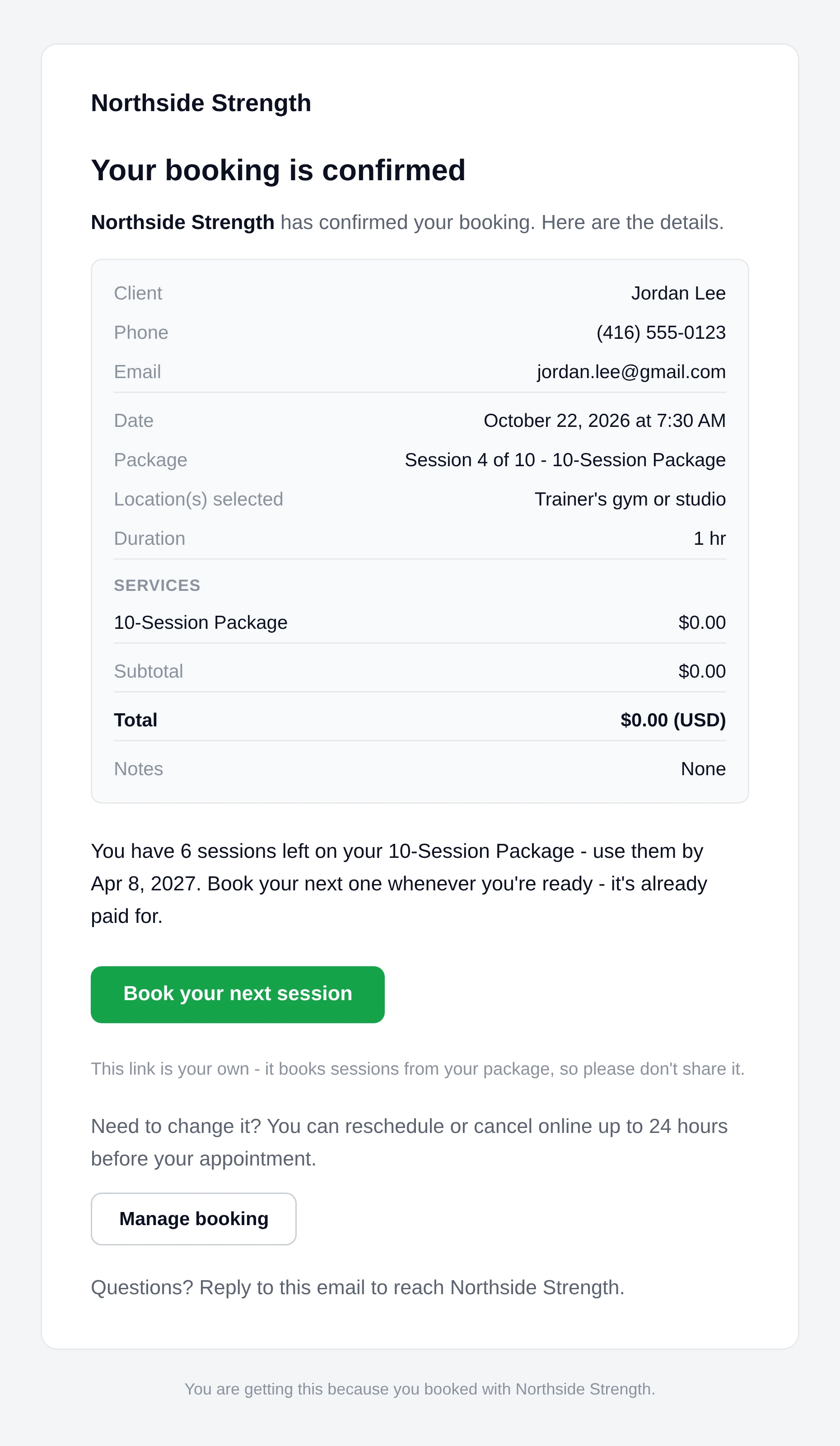
  2. Their confirmation email has a Book your next session button, with how many are left: "You have 9 sessions left on your 10-Session Package."
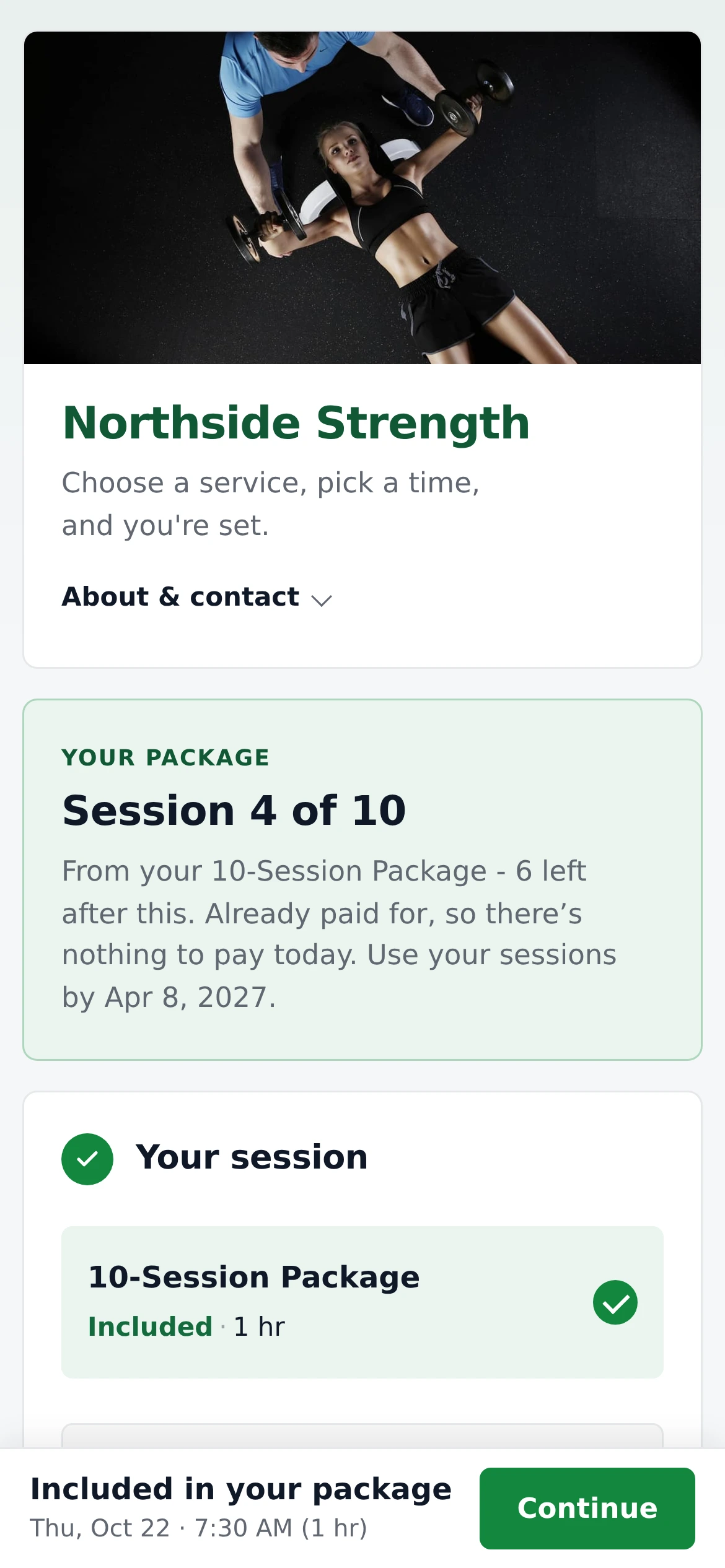
  3. The button opens your booking page in package mode: only the package's session, already paid for, with their details filled in, headed with which session it is ("Session 2 of 10"). They pick a time and they're booked, and the summary shows "Session 2" with the package's name under it, marked Included.
  4. The balance counts down, and every confirmation - and the thank-you email after a completed session - carries the same link, so the next session is always one tap away.
The Northside Strength booking page on a phone in package mode: Your package, Session 4 of 10, from your 10-Session Package with 6 left after this, already paid for so there's nothing to pay today, use your sessions by Apr 8, 2027. The 10-Session Package is picked and marked Included in your package, and the bar at the bottom says Thu, Oct 22 at 7:30 AM.
Jordan's link opens the booking page with only their package session - no price, no payment step.
Booking confirmation email from Northside Strength to Jordan Lee for October 22, 2026 at 7:30 AM, with the line Package: Session 4 of 10 - 10-Session Package, a $0.00 total, You have 6 sessions left on your 10-Session Package - use them by Apr 8, 2027, a green Book your next session button and a Manage booking button.
Every confirmation says which session it is, what's left, and links to the next one.

A package session follows your usual booking mode: with Instant booking on it's confirmed right away, otherwise it arrives as a request for you to confirm. It can't carry a paid add-on, a coupon or a location fee, so it always comes to $0.

How sessions are used

Clear rules, and you can override any of them.

  • A booked session is used while it's Pending, Confirmed, Completed or a No-show.
  • Cancelled on time, it goes back. When a client cancels from their Manage booking page - only possible before your cutoff - the session returns to their package automatically.
  • You cancel or decline: your call. Changing a package session to Cancelled shows Give this session back to their package, on by default. Turn it off to keep the session used for a late cancel under your policy.
  • A no-show keeps it used. You can still give it back as an exception, with a reason.
  • Rescheduling keeps the same session, whether the client moves it online or you do.
  • Expiry is optional. Set "Use within" on the service (say 180 days from purchase). After that date the client's link explains it expired and asks them to contact you; you can still book from it or change the date.
Booking Details with Status set to Cancelled and a switch, turned on, labelled Give this session back to their 10-Session Package, with the hint Turn it off to keep the session used - a late cancel under your policy.
Cancelling a package session on Booking Details.
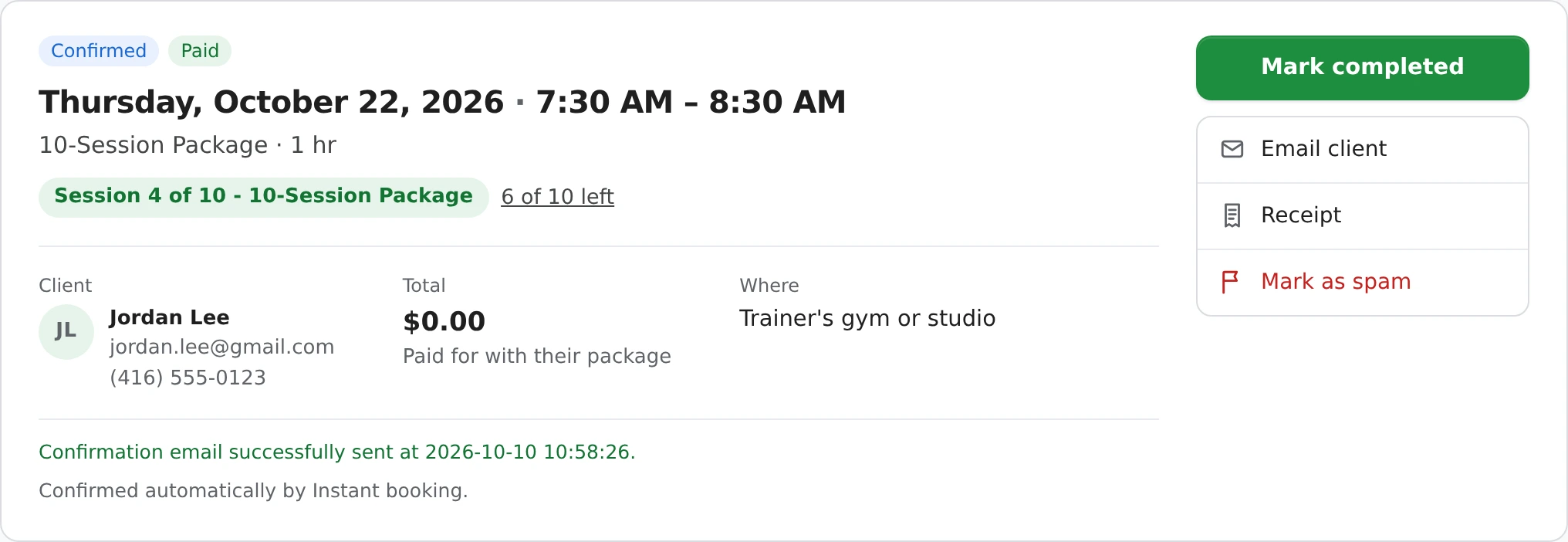
1MinuteBooking Booking Details for Jordan Lee on Thursday, October 22, 2026, 7:30 to 8:30 AM: 10-Session Package, 1 hr, a green tag Session 4 of 10 - 10-Session Package with a link 6 of 10 left, a $0.00 total paid for with their package, Confirmed and Paid badges.
Every package booking says which session it is - on Booking Details, the Bookings list, receipts and the client's emails.

Your tools: the client's Packages panel

Open a client who owns a package and everything is in one place.
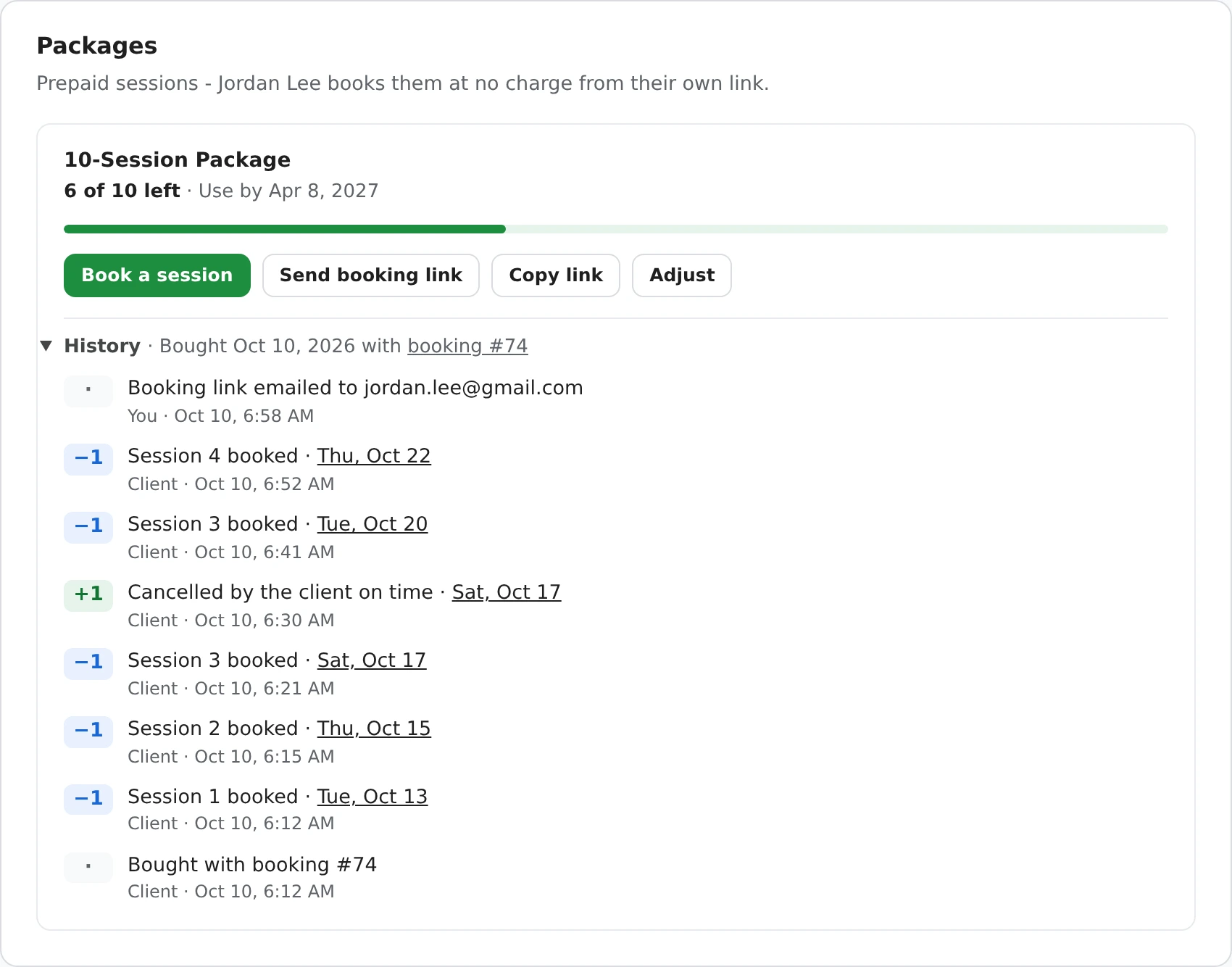
The Packages panel on Jordan Lee's client profile: 10-Session Package, 6 of 10 left, use by Apr 8, 2027, a progress bar, buttons Book a session, Send booking link, Copy link and Adjust, and the history: bought with booking 74, sessions 1 to 4 booked, one cancelled by the client on time and given back, and the booking link emailed to jordan.lee@gmail.com.
What's left, the four tools and the full history - who did what, and when.
  • Book a session opens New booking with the client and their package picked, at $0. Add Repeat to book a weekly run in one go - each visit uses one session, and any past the last session is skipped.
  • Send booking link emails the client their link and balance - for the client who lost their confirmation email. It's sent to addresses your confirmations already reached; for anyone else you get Email booking link, which opens your own mail app with the link written in.
  • Copy link for a text message or chat.
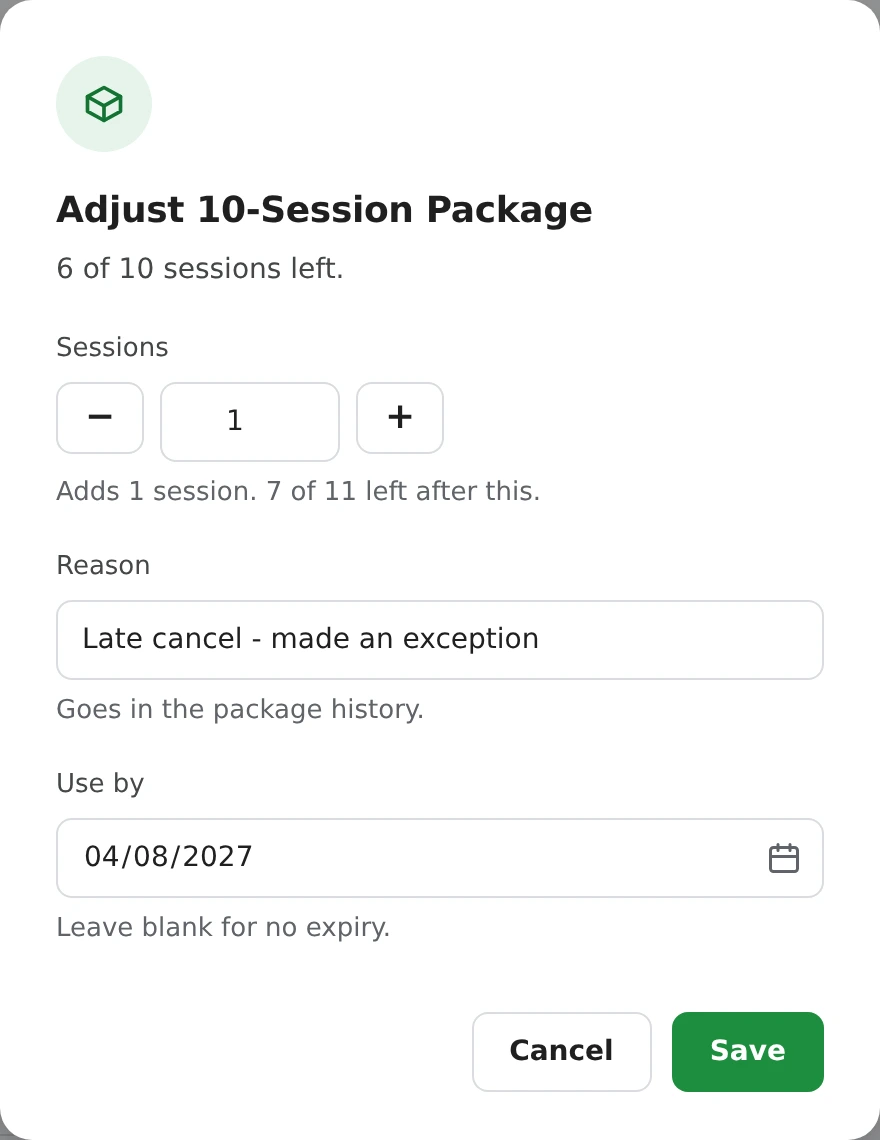
  • Adjust adds or removes sessions with a short reason ("Late cancel - made an exception"), or changes the use-by date. The reason goes in the history. Once a package has been adjusted, the client's booking page shows the session number and how many are left ("Session 5") instead of "of 10".
The Adjust 10-Session Package dialog: 6 of 10 sessions left, a Sessions stepper set to 1 with Adds 1 session. 7 of 11 left after this, a Reason field reading Late cancel - made an exception, a Use by date of 04/08/2027, and Cancel and Save buttons.
Giving a session back as an exception, with the reason kept.

New booking also offers Use a package session whenever the client you pick has a package for the service you pick, so a booking you take by phone comes off their balance too. Clients without a package never see any of this, and neither do your other clients' profiles.

Money and refunds

The money is taken once, on the booking that buys the package.

  • Sessions 2 onward are $0 bookings, so your revenue and analytics count the package once. Excel exports have a Package column.
  • A request you decline before anything is paid - or a first booking cancelled with nothing paid and no other session booked - voids the package. Restore the booking and the package comes back.
  • Nothing is refunded automatically. A package paid by card stays in your Stripe account. If you refund it, use Adjust to remove the sessions that are left; a full Stripe refund on a cancelled first booking with nothing else booked voids the package for you.
  • Deposits work too: take a deposit when the package is bought and collect the rest at the first session.

Turn any service into a package

Packages come ready-made for six business types, and any one-price service can be one.

Editing the 10-Session Package service in Settings: name, $700.00 price, 1 hr length, the description, One price picked, Where does it happen? set to Client picks one of your locations, and a Prepaid package section with Sell it as a prepaid package of sessions ticked, 10 sessions in the package and Use within 180 days.
Settings > Service types > Edit. On other services these fields wait under Advanced settings.
  1. Open Settings > Service types and edit a one-price service.
  2. Under Advanced settings, turn on "Sell it as a prepaid package of sessions" and set how many sessions (2 to 100).
  3. Optionally set "Use within" a number of days. The price is for the whole package; each session is the service's length.

Starter packages by business type

Prices and names are starting points you can change. Tutors, massage therapists and anyone else who sells sessions in bundles can make their own. Full details are in the help center.

Questions

Can clients book their remaining sessions themselves?

Yes. Every confirmation email has a Book your next session button with how many are left. It opens your booking page with only their package session, already paid for, so they just pick a time.

What if a client loses the email with their link?

Open their client profile. In the Packages panel, Send booking link emails them their link and balance again, Copy link lets you text it, and Book a session books it for them at no charge.

Do unused sessions expire?

Only if you want them to. Set Use within a number of days on the service and each package can be used until that many days after purchase. You can change the date on one package with Adjust, and you can still book from an expired package yourself.

Can I give a session back after a late cancel or a no-show?

Yes. When you cancel a session you choose whether it goes back, and on a no-show or a cancel you kept as used, Give this session back returns it with your reason. Adjust can also add or remove sessions. Every change is in the package history.

What happens when a client cancels online?

If you let clients cancel online, they can only do it before your cutoff, so it counts as on time and the session goes back to their package automatically.

How do refunds work for a package?

Money is taken once, on the booking that buys the package, and nothing is refunded automatically. If you refund a package, use Adjust to remove the sessions that are left. A request you decline, or a first booking cancelled before anything is paid, voids the package.

Does it work with instant booking and deposits?

Yes. Package sessions follow your booking mode - confirmed right away with instant booking, or sent to you as requests. The package itself can be paid in full by card, with a deposit, or at the first session.

Can I sell more than one package to the same client?

Yes. A client can own several packages, each with its own link, balance and history, and the Packages panel lists them all.

What does it cost?

Prepaid packages are free on every plan.

We'll ask which Google account to use next.
Continue with Google
or