

Free online booking and scheduling for solo and small service businesses
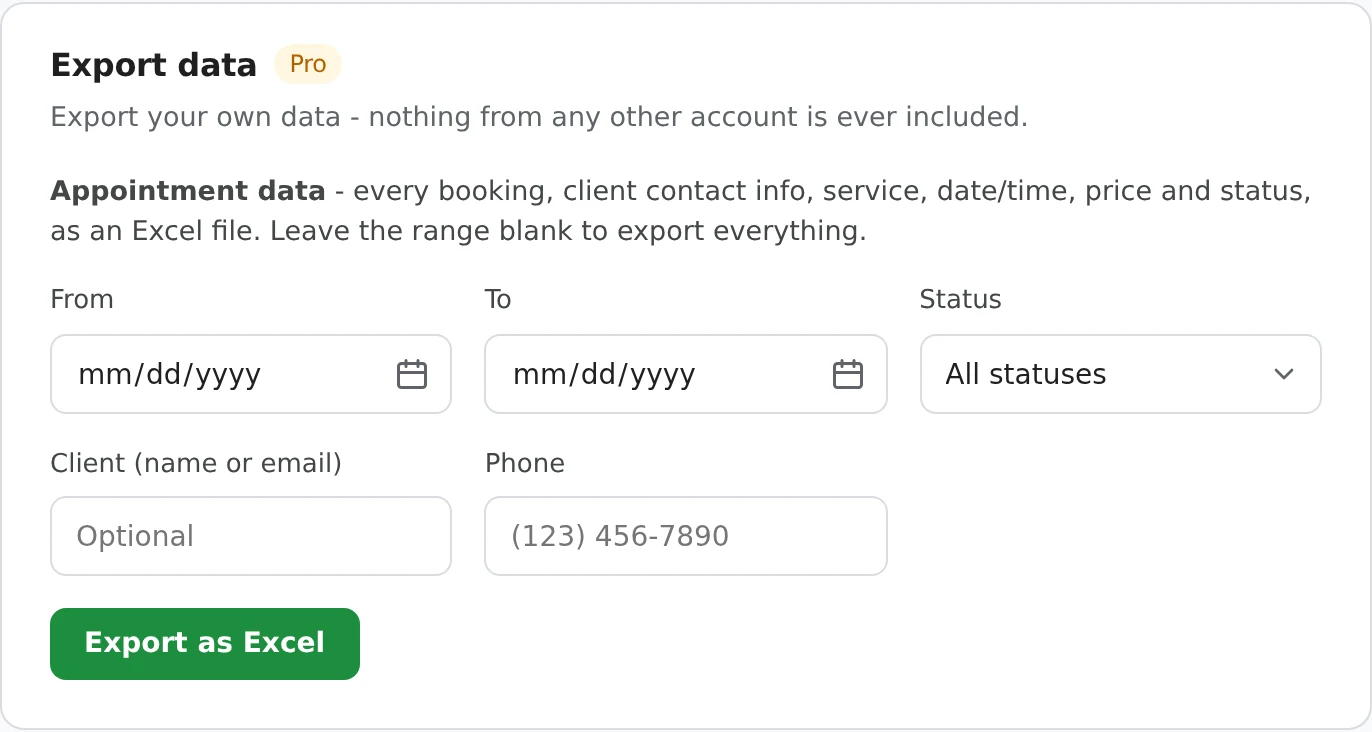
One click downloads your appointments as an .xlsx file: client contact details, services and add-ons, every price line, status and how it was paid. Filter by date range, status or client, then open it in Excel, Google Sheets or Numbers.
Export data is in Settings > Account & plan. Pick what you want, or leave it blank for everything.
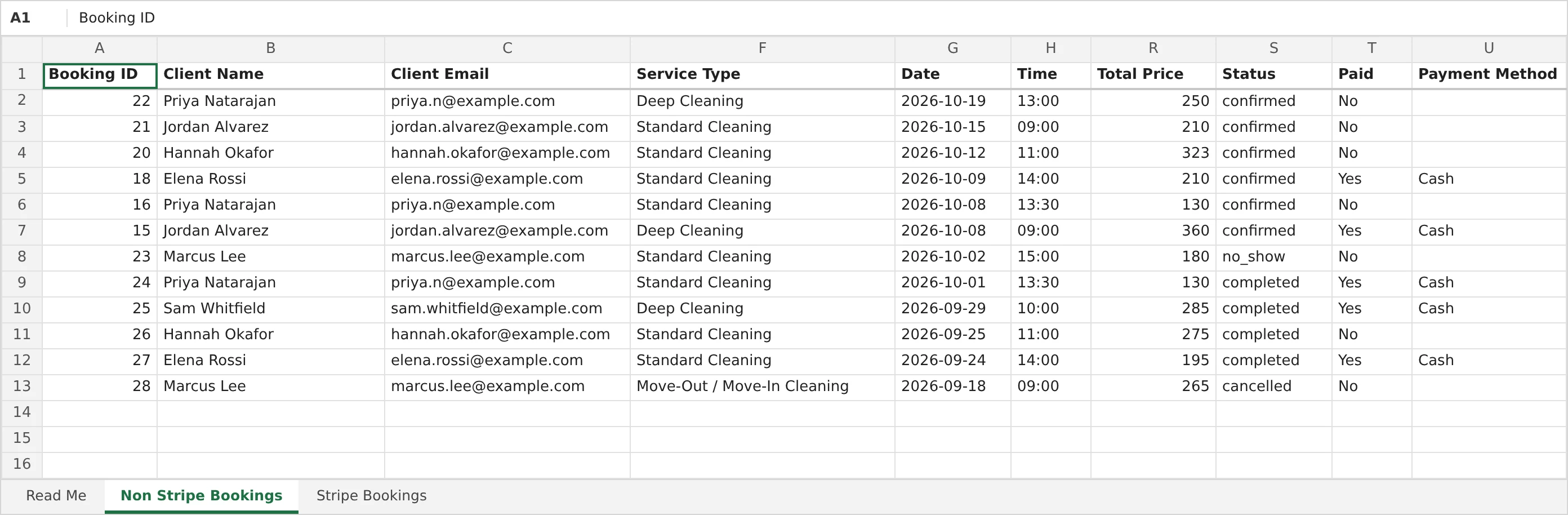
The same details you see in Booking Details, laid out as columns with a frozen, filterable header row.
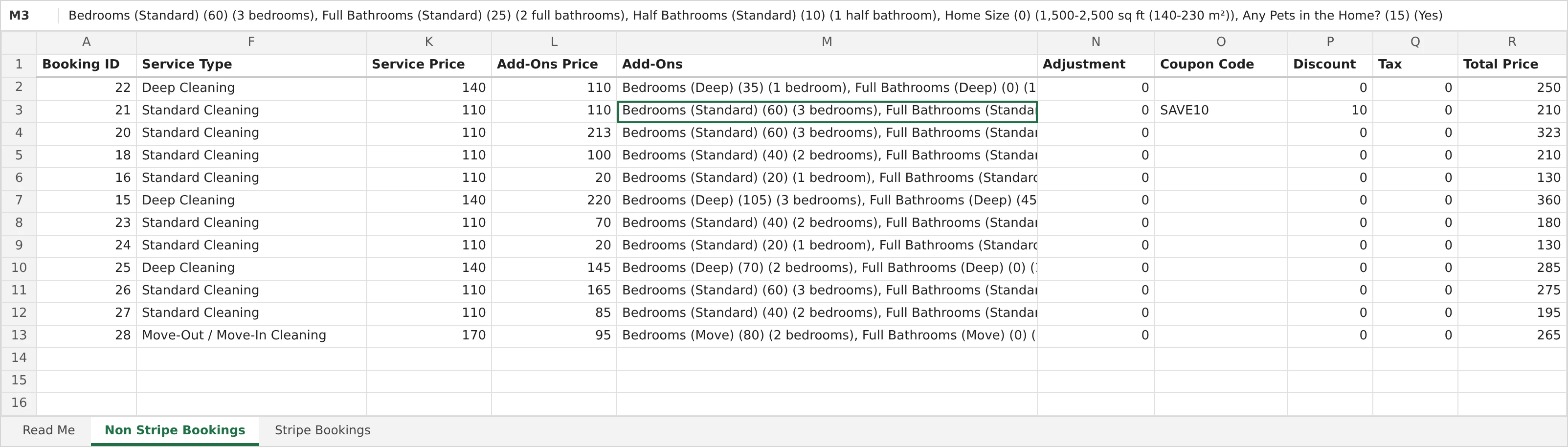
Prices are broken out the way the booking was built: the service, each add-on with its price and the option picked, any adjustment, the coupon code and discount, tax, and the total.
A booking for more than one dog, person or vehicle lists each one's services and add-ons separately. Bookings in your Spam folder are left out.
Bookings paid by card through Stripe get the payment details your bookkeeper will ask for.
The Stripe Bookings sheet has every column above, plus whether it was a deposit or full payment, the amount paid by card, the deposit, any refund issued and the Stripe payment ID to look it up in Stripe. Every booking appears on exactly one sheet: Stripe Bookings or Non Stripe Bookings.

A Read Me sheet at the front explains both sheets. Refunds made in Stripe show up once you've opened that booking since, so for a full reconciliation export payments from your Stripe Dashboard as well.
Export the year, add up a few columns, and you have the figures your accountant or tax software asks for.
=SUM( and select the column.A starting point, not tax advice: what counts as income and which taxes apply depend on where you work. Your accountant can tell you exactly what they need.
A year of income, tax collected and discounts in one file for your accountant. How to add it up.
Filter to Completed, then sort by Paid to see who still owes you.
Type a client's name, email or phone to export just their bookings, notes and answers.
Pivot by service, add-on or coupon to see what sells. Pro also has built-in analytics for revenue, busiest days and top services.
Your bookings are yours. Export everything whenever you like and keep a copy.
Text a client typed is stored as plain text, so a name or note that looks like a formula can't run when the file is opened.
Excel export comes with Pro, $10 USD a month. New accounts start with a 14-day Pro trial, so you can try it on your own bookings.
Pro also adds your own booking page design, your logo and photos, a link to your Google reviews, analytics, and no "Powered by" badge. Taking bookings, coupons, tax, spam protection and card payments are all on the free plan.
Go to Settings > Account & plan, scroll to Export data, optionally set a date range, status, client or phone, and click Export as Excel. The .xlsx file downloads right away. Leave the filters blank to export everything.
Every booking: client name, email, address and phone, service, date, time and duration, location, service price, add-ons price and each add-on, adjustment, coupon code and discount, tax, total, status, paid, payment method, client notes, internal notes, answers to your booking questions and when it was booked. Card payments add the amount paid, deposit, any refund and the Stripe payment ID.
Yes - it's a good starting point. Export January 1 to December 31 with Status set to Completed, then add up Total Price minus Tax for your income before expenses, and Tax for the sales tax you collected. Expenses and card fees aren't in the file: get Stripe's and 1MinuteBooking's fees from your Stripe Dashboard. Check with your accountant for what applies where you work.
Yes. It's a standard .xlsx file, so Excel, Google Sheets, Numbers and LibreOffice all open it. In Google Sheets, use File > Import or drag it into Google Drive.
It's part of Pro ($10 USD a month), and new accounts get a 14-day Pro trial. Everything else about taking bookings is on the free plan.
No. Bookings in your Spam folder are never exported.
Most bookings aren't paid through Stripe, so the Stripe columns would be blank on most rows. Bookings paid by card are listed on the Stripe Bookings sheet with all the same details plus the payment columns, and every other booking is on Non Stripe Bookings. Each booking appears on exactly one of the two.
The export shows the last payment status 1MinuteBooking knows. A refund made in Stripe is picked up the next time you open that booking. For a full reconciliation, export payments from your Stripe Dashboard as well - the file's Read Me sheet explains how.
Sign up here and pick your type of business in setup - your page starts set up for it. You can change anything later.